


Get ready to toss out all the norms and conventional wisdom about distributed compute! Today, we are eradicating the belief that DuckDB can only be used for “small” data.
In this article, we will attack the following beliefs:
Only Spark can be used for terabytes of data (or it is ALWAYS the best choice)
You need a lot of time to process TBs of data
We want to leave your head spinning at the end of this article. Wondering if everything you learned about MapReduce was wrong!
This Article is brought to you by
We want to give a shout-out to MotherDuck, who is sponsoring this article and providing the infrastructure for the benchmarks!

You Said to Use DuckDB On Small Data

Previously, I was a champion of using DuckDB for any dataset that was “small” (< 20GBs). Recently, I was challenged on that remark on LinkedIn by some astute data engineers, who said I had a misconception about what DuckDB was capable of. Being the curious data engineer I am, I took a bite on that bait and decided to roll up my sleeves and benchmark much larger datasets.
But how much larger?
Also - if you want to subscribe to Matt’s Substack, you can click here.
I first decided to go after ~200 GBs. DuckDB read that data in <10 seconds.
This was too fast. It felt magical. What about 500 GBs? Then I hit a wall: a physical wall. The hard drive on my Mac M2 didn’t have enough space for 500GBs. I strolled to my local Best Buy and picked up this thing:
Side Note - A 4 TB external hard drive might seem like overkill; this was one of those “Go big or go home” moments. I figured in my mind “well if 500gb works, I want to have enough runway for much larger tests down the road”
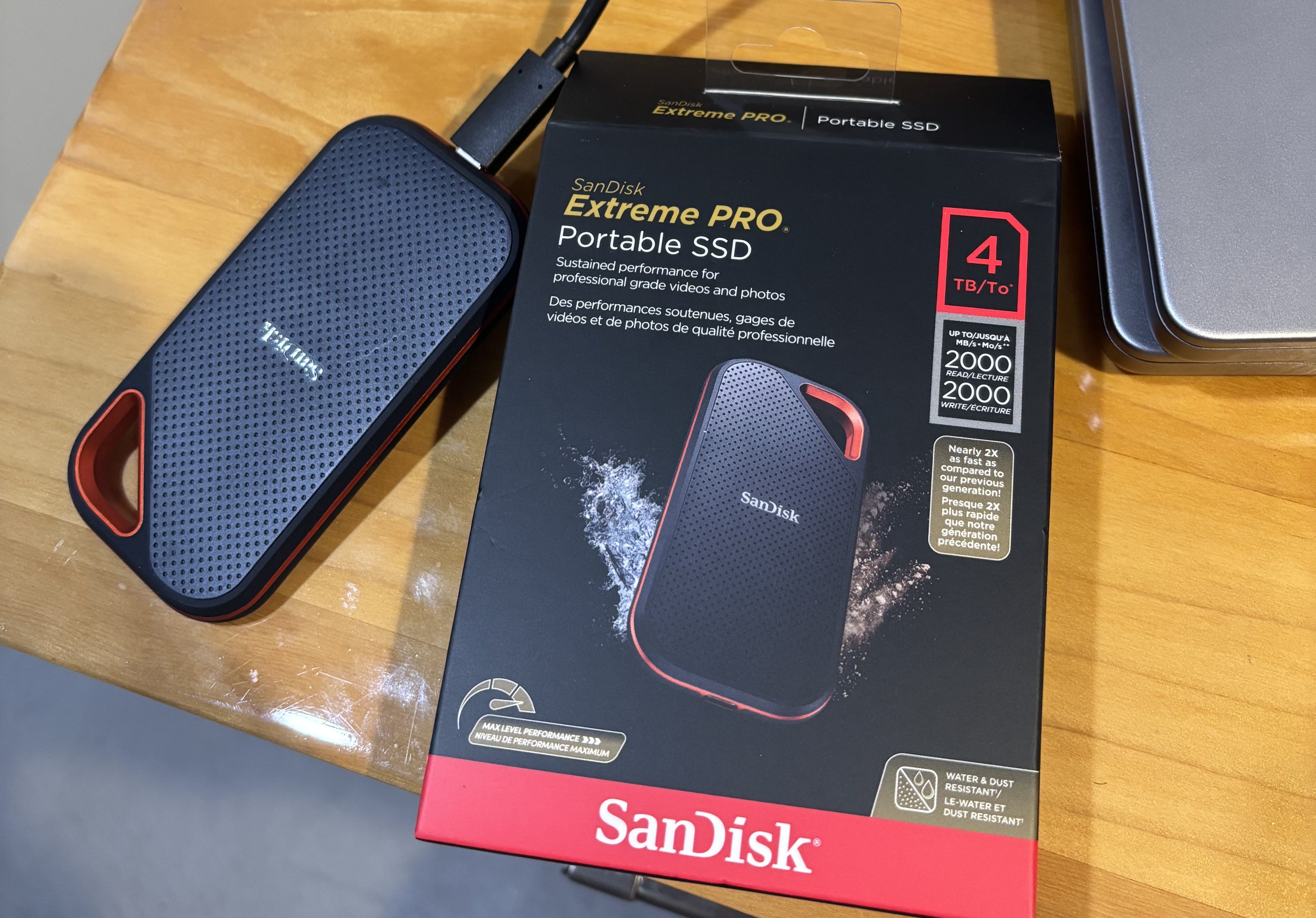
I created a 500GB dataset on the external drive in DuckDB. It read that data in ~40 seconds
This made me realize I needed to set my sights on the big kahuna. 1 full TB of data!
Building A 1 TB Dataset for DuckDB
In my previous articles, you will see that I use a script that leverages DuckDB’s' generate_series' function to generate rows of data quickly. The gist of it looks like this:
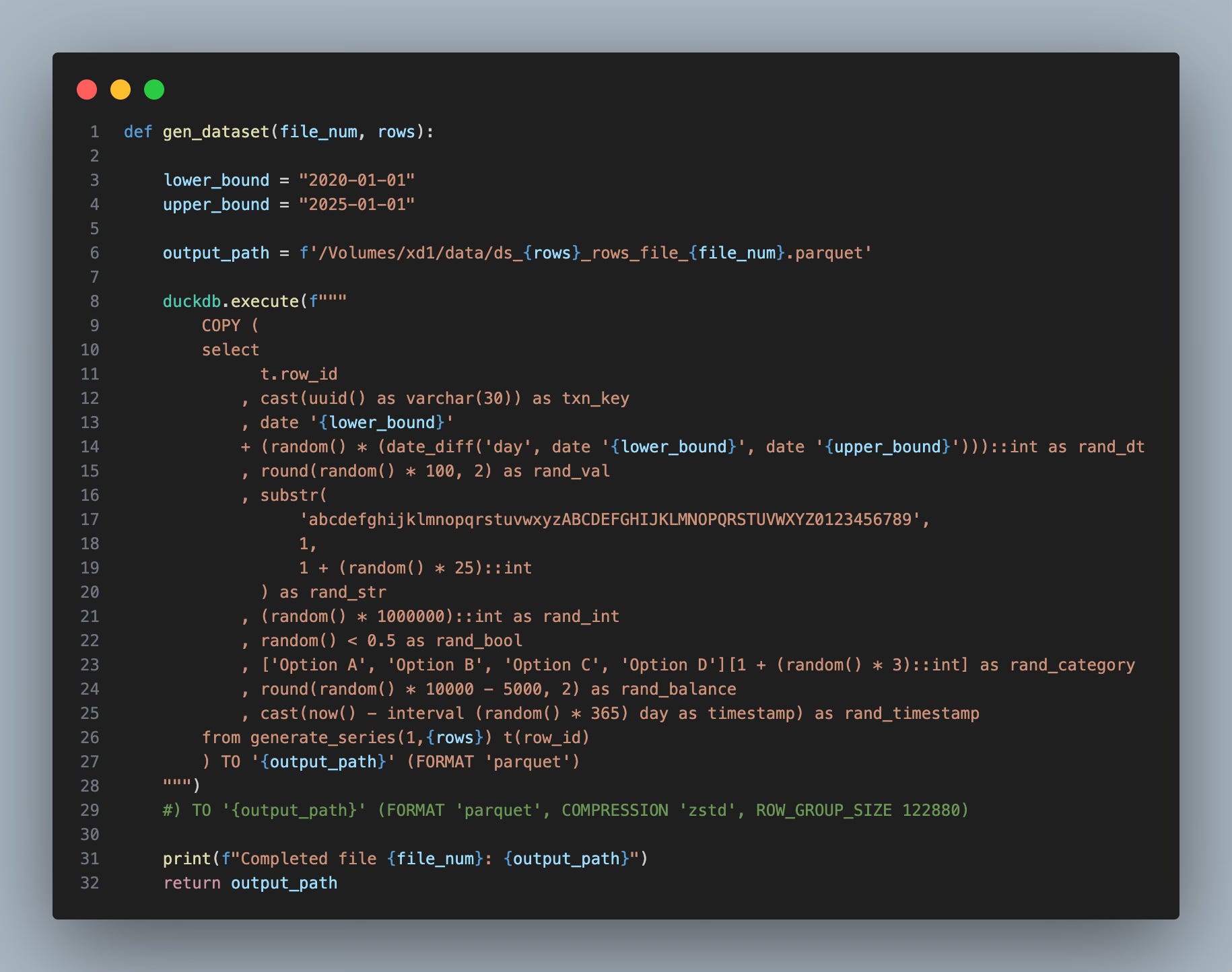
It’s straightforward:
You pass in a row count and let it generate a Parquet file.
If we want to do this at scale and not wait several hours (or go dreaded serialized). What do you do?
Bring in the good ol’ Python ProcessPoolExecutor and go parallel. (code here)
Ok, But Did You Really Generate A Full TB Of Data?
Yes, it took my M2 Pro (16GB of RAM) ~70 minutes to fry this egg with 10 workers in parallel. Here’s the proof:
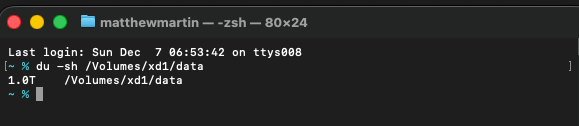
The dataset is: 400 files, each ~2.76GB in size.
So now, without further ado, let’s get cracking and run some benchmarks on this.
Side Note - If you have not moved from the old Python virtual environment of “-m venv” over to UV, do yourself a favor and do it now; uv loads packages faster, makes targeting specific Python environments easier; I could go on…you’ll thank me later
The Benchmark…And What Exactly Are You Doing Here?
Today’s benchmark will:
run a common aggregation query across the 1TB dataset;
It will group by a date, count rows, and sum a value.
This is a common analytics query I have seen in my last two decades as a data engineer and BI leader; I did not cherry-pick this to just make DuckDB look good. This is what the benchmark query boils down to:
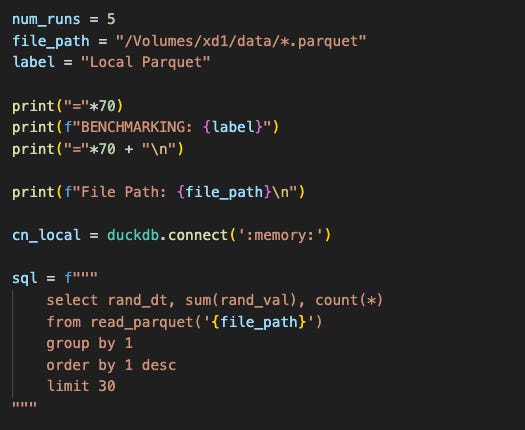
For our benchmark, we will run it 5 times. Below are the results:
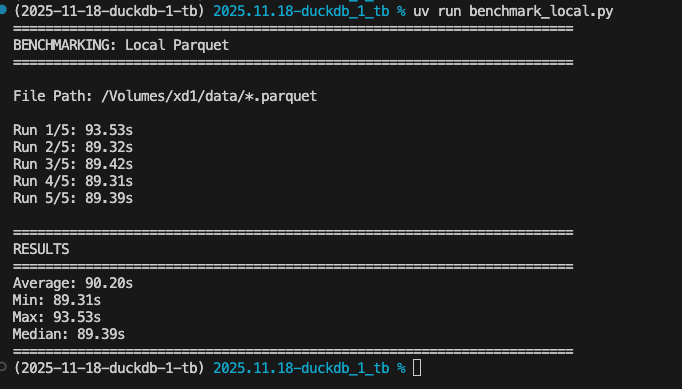
Average processing time locally: 1 minute, 29 seconds.
Hold On - You Said We Could Crush A Full TB In Under 30 Seconds!?
I did say that. This first benchmark was on my laptop and local computer, which is impressive.
What would happen if I were to create a full 1TB dataset in MotherDuck and try this again?
Time To Join The Flock
On MotherDuck, we have excellent options to load data. We could do stuff like:
store CSVs and Parquet in S3/Azure/GCP
import the TCP-H dataset
Use our local CLI to generate data
For this article, I chose the third option. Here is the script that created the 1TB dataset in MotherDuck:
I created a view in a MotherDuck database that leveraged the generate_series function (like in the previous local benchmark). After that, I ran the script to iterate over and insert the data multiple times.
After 10 iterations, I saw it wasn’t quite at 1TB; I manually ran the load process several times more until I got 1TB.
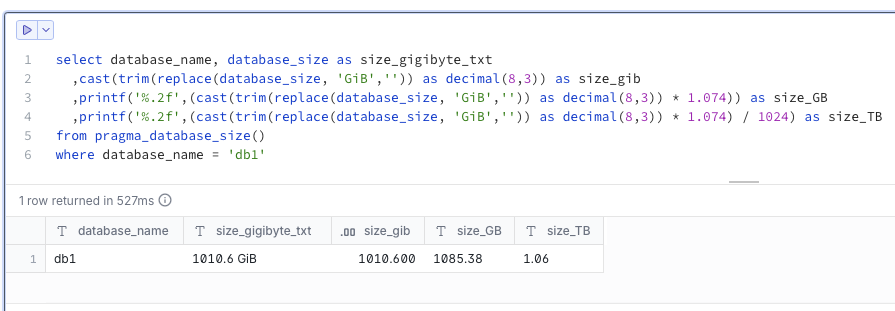
We now have over 1TB of data. Now it’s time to choose our compute capacity.
In MD, we have four standard options for compute capacity: Pulse, Standard, Jumbo, and Mega. I went with Mega, given we are dealing with a full TB of data:
For the benchmark, we ran the exact same query we did locally, but with a caveat;
MotherDuck has intelligent caching; running the same query five times will have results 2-5 be about 5 seconds or less because it will read from cache vs. actually scanning the data.
So how do we get around that?
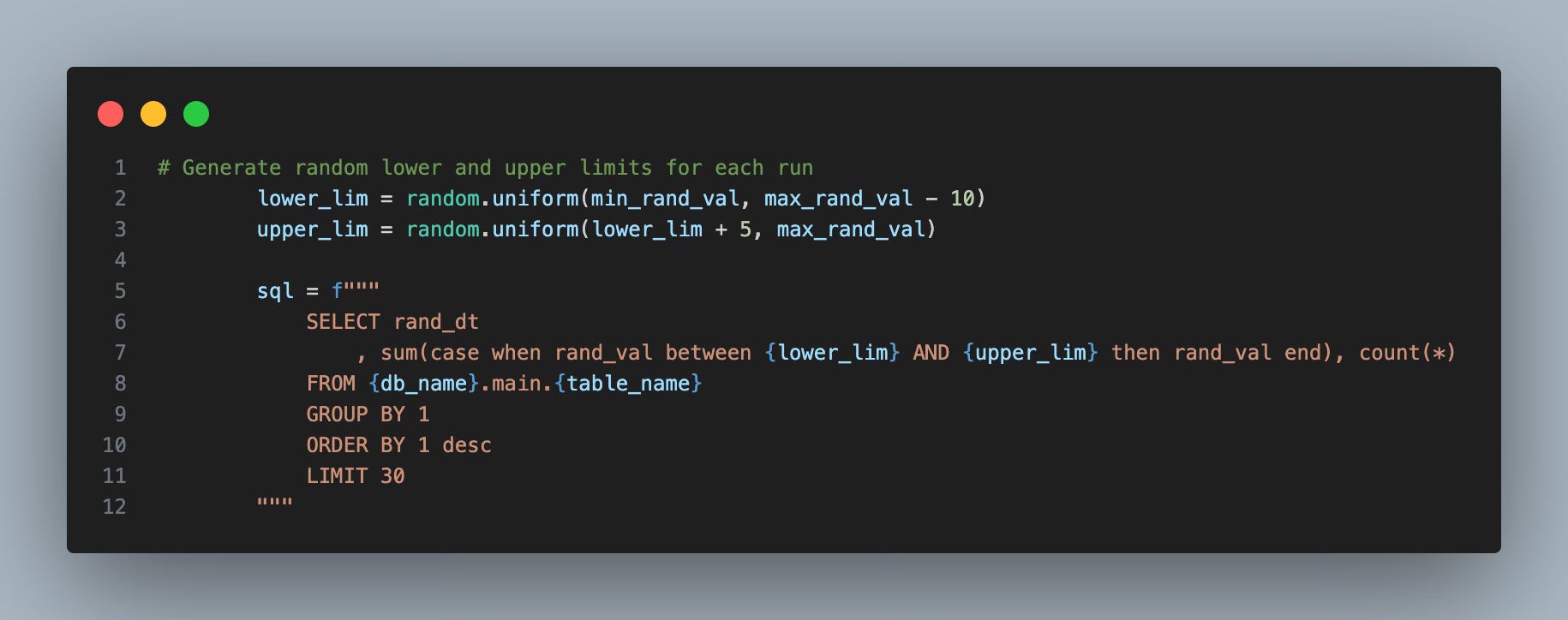
Simple - for each iteration, we will have our aggregation values sum a different lower and upper range, which makes the query non-deterministic, and removes the ability for it to just hit the cache layer. The query template looks like this:
Below are the results of our benchmark:
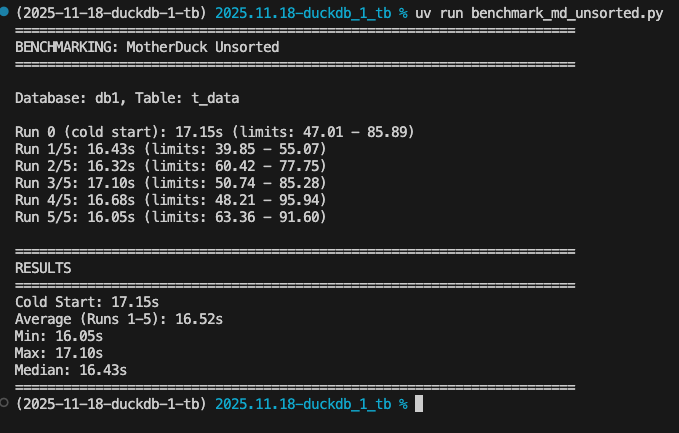
Holy Smokes -
That was clocking in at under 17 seconds on average. You might also ask - “Hey what is that run 0 a.k.a the cold start?”
Remember, we are now dealing with a cloud data warehouse, which will not always keep our data readily available to rip from RAM; sometimes, it will be on disk and have to get read in; thus, the iteration 0 is a warm up run, incase its having to read off of disk for the first usage; for datasets you will query often in MotherDuck, this won’t be an issue, as your data will more than likely be ready to process and sit in hot ram.
Ok, Great Stuff! We Are Done, Right?
We blew our promise of scanning a full TB in under 30 seconds out of the water, by a factor of 2. But what if we wanted faster?
I’m Ready - Let’s Go Deeper
DuckDB supports indexes, but they don’t really push the concept much. The Zonemap index is a secret weapon that allows you to take advantage of pre-sorted data through min/max tracking of the metadata.
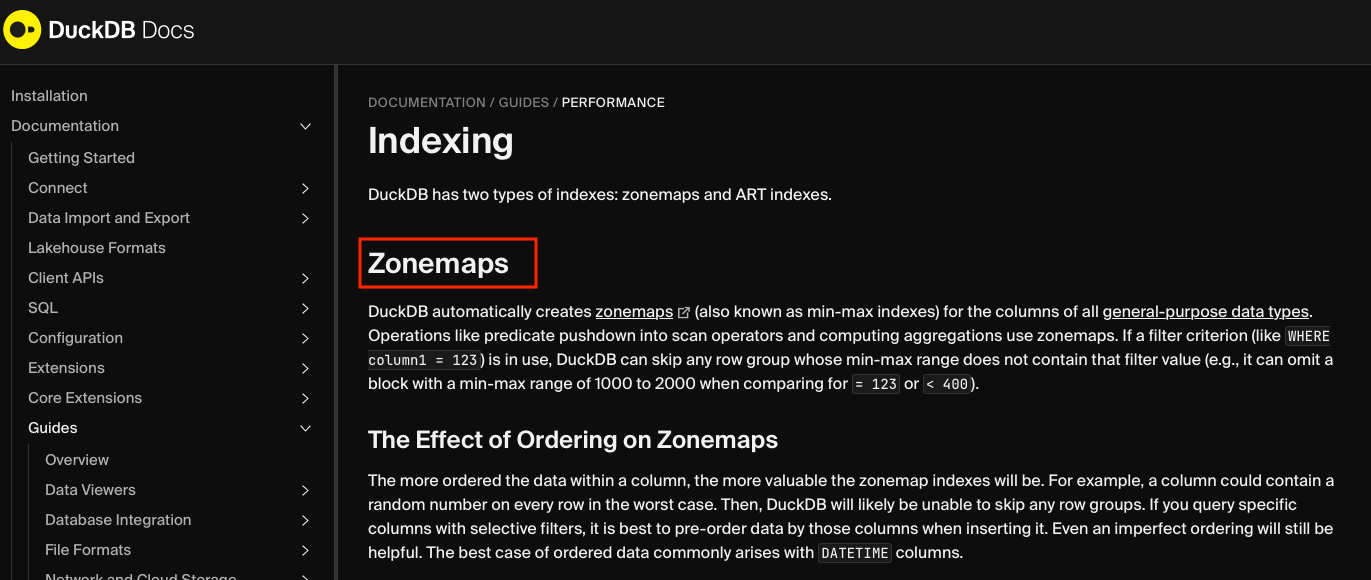
How would I implement these zone maps?
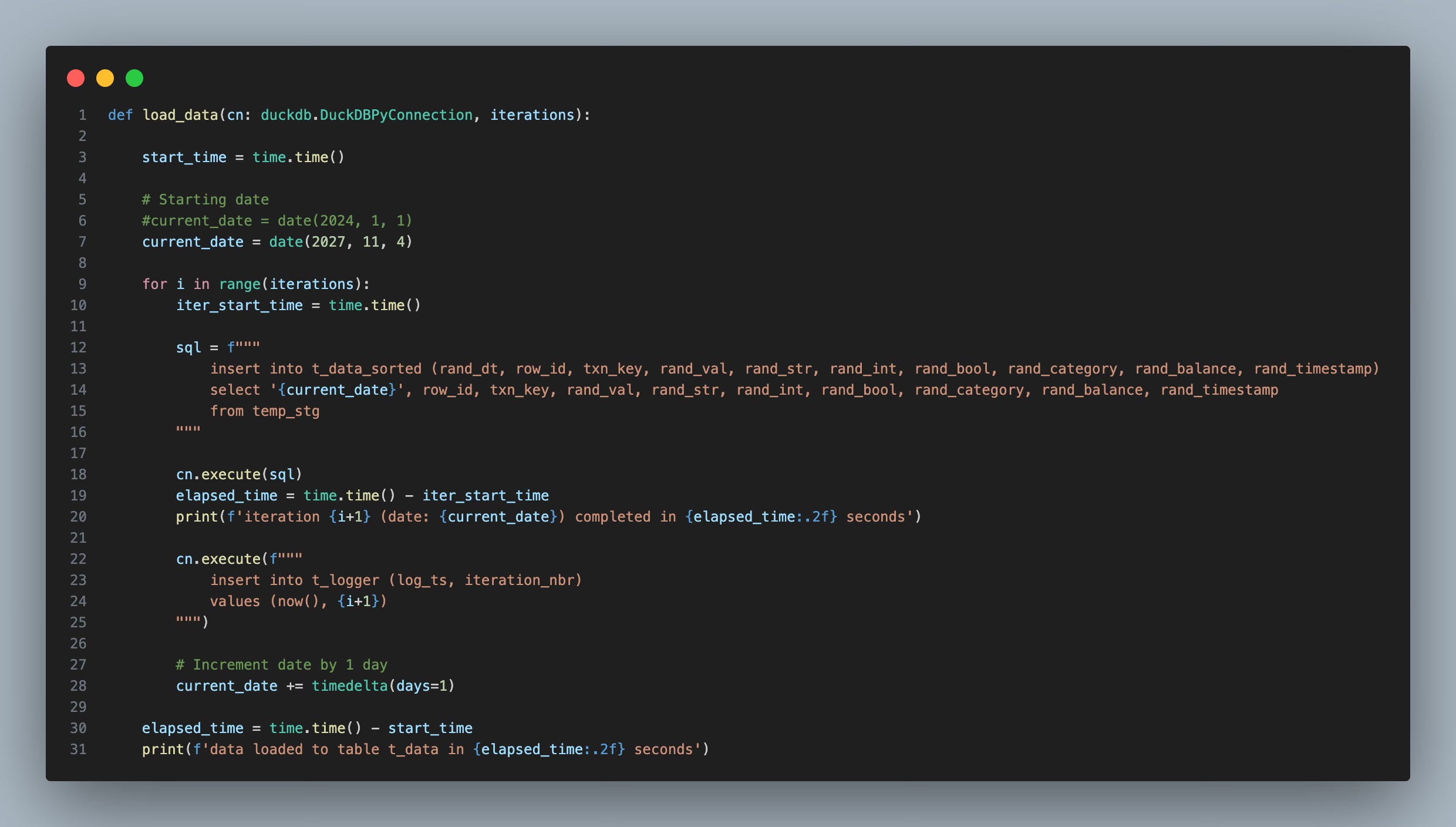
Let’s reload our dataset where we sort and insert on the rand date. The load process looked like this:
Once that was complete, I created another benchmark, and here were the results:
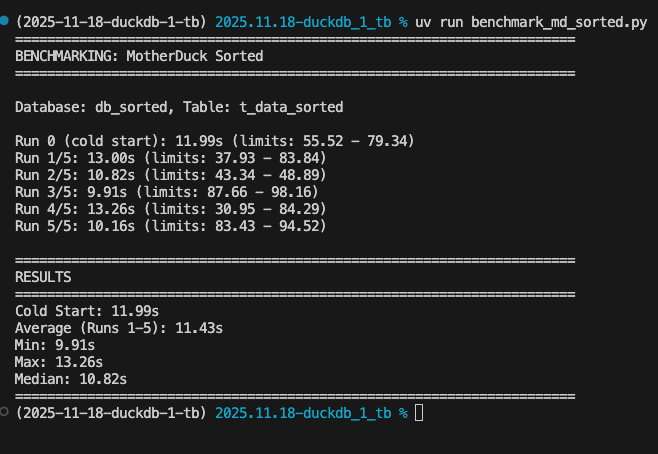
The sorted (zonemap) dataset improved our benchmark time by roughly 30%. That is an amazing tweak, simply by loading the table in a sorted order by the field we are grouping by.
Summary
This article showcased a paradigm shift in DuckDB’s capabilities! We have now shattered the belief of what “small” data is and what the duck can do. Even on my local laptop, we were still scanning 1TB of data in <2 minutes. If my batch jobs refreshed my reports in 2 minutes without Spark, I would be very happy!
Here are all the code examples.
Thanks again, MotherDuck, for providing us with the environment to showcase this capability!
Thanks for reading and happy holidays! If you found value in this article, make sure to comment and share with your friends!
Matt and Zach
Great benchmarks here. The real lesson we see repeatedly: performance comes less from which platform and more from how thoughtfully data is structured and queried.
For most organizations, modern platforms already deliver far more performance than 99% of workloads actually require, but the real gap is usually design, not technology.
Very cool. One question I have is: about I/O. What if the data was not local (i.e., on S3?) and you were running this on an EC2?